A QR code on an insert card has to do two things well, and sellers tend to get one of them wrong. It has to scan on the first try, from a phone held at arm’s length, off a small printed card, and it has to point the customer somewhere the marketplace actually permits. A code that is too small or too dense fails silently, and a code that links to the wrong destination can put an Amazon account at risk. Here is how to get both halves right before the cards go to print.
Size it for the scan, not the layout
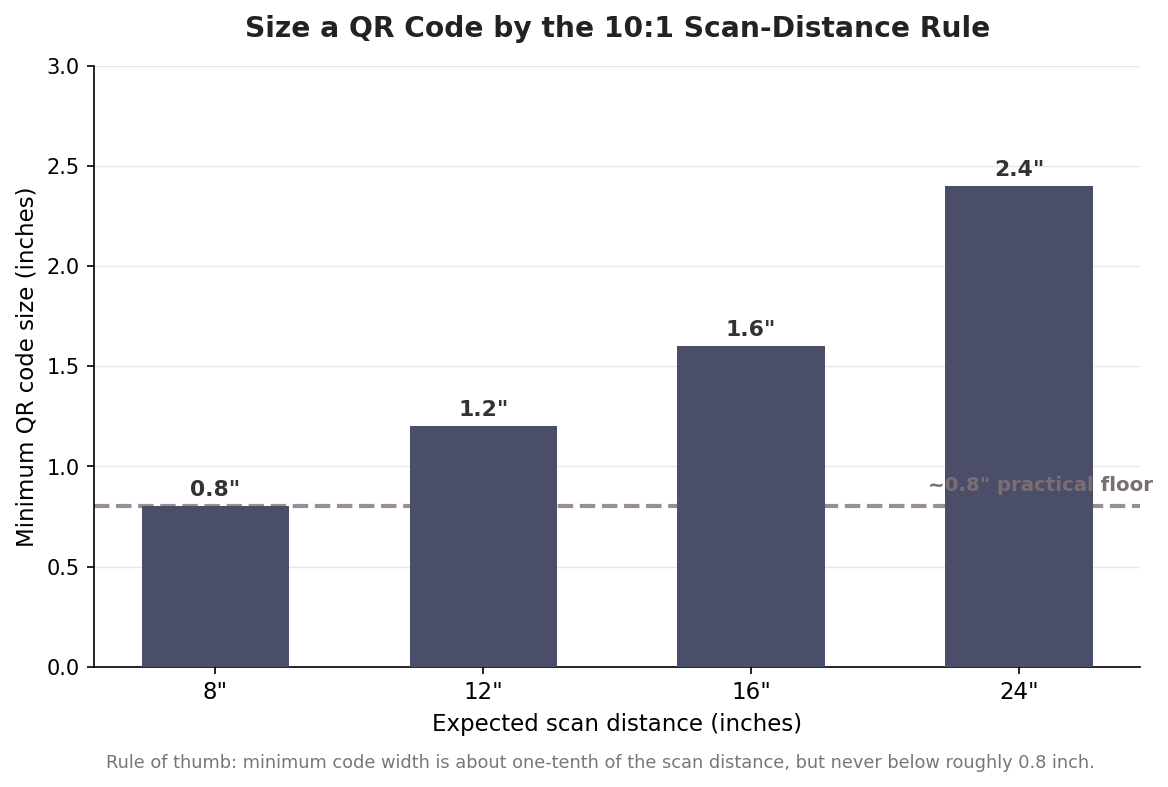
The most common reason a printed QR code fails is that it was sized to fit the design rather than the scan. A workable rule of thumb is the 10:1 ratio: the code’s width should be about one-tenth of the distance it will be scanned from. An insert card is usually read at roughly arm’s length, so a code meant to be scanned from eight to twelve inches away wants to be around 0.8 to 1.2 inches wide, and a code someone might scan from farther back needs to grow proportionally. Below about 0.8 inch, scanning gets unreliable no matter how good the phone is, so treat that as a practical floor even when space is tight. The chart below turns the rule into concrete sizes.
Give it room, contrast, and a flat surface
Even a correctly sized code fails if it is crowded or camouflaged. Every QR code needs a quiet zone, a clear margin of at least four modules, meaning four of the little squares, on all four sides, and packing artwork or a border right up against the code is a frequent cause of missed scans. Contrast matters as much as size: dark code on a light background is what scanners expect, and reversing it to a light code on a dark or photographic background, while trendy, lowers the read rate. Watch the finish, too, because a glossy laminate can throw glare that blinds the camera under store lighting, which is one reason matte or soft-touch cards often scan more dependably. Finally, never let the code straddle a fold or a curve; on a bi-fold insert, keep it flat on a single panel with room to spare.
Choose static or dynamic, and mind the error correction
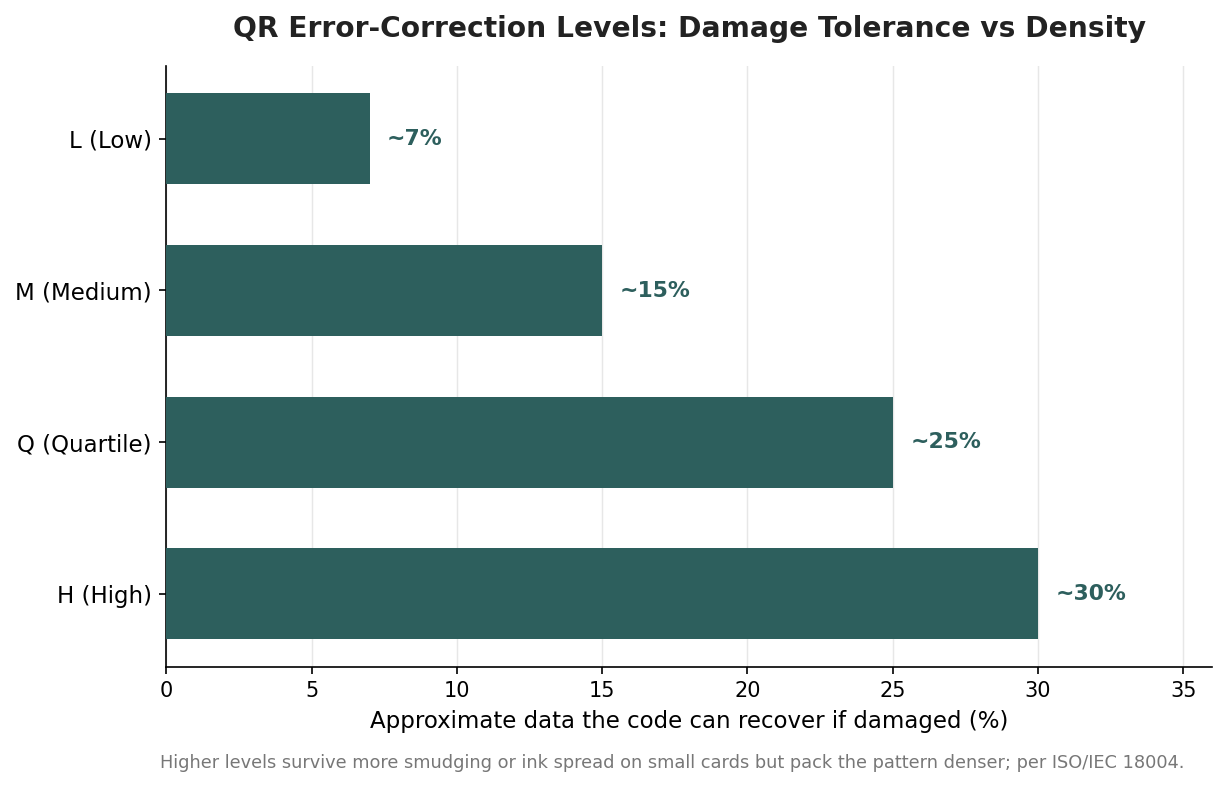
A static QR code encodes the destination directly, which means a long URL produces a denser pattern that has to be printed larger to stay readable. A dynamic code instead stores a short redirect link, so the printed pattern is simpler, can be smaller, and, crucially, can be re-pointed after the cards are printed and tracked for scans. For anything you might want to update, such as a landing page or a seasonal offer, dynamic is usually worth it. Independently of that choice, QR codes carry an error-correction level, from L up to H, that determines how much of the code can be smudged or damaged and still resolve. Higher levels recover more, roughly 7, 15, 25, and 30 percent across the four levels, but they add density, so on a small insert card a middle level often balances resilience against printability. Keep the encoded URL short either way; shorter data keeps the pattern open and easy to scan.
Point it somewhere the marketplace allows
If the product ships through Amazon, the destination is governed by Amazon’s communication and reviews policies, and this is where inserts get accounts suspended. You may use a QR code that links to your Amazon storefront, to a warranty or product-registration page, or to genuine setup instructions and support, and you may ask for feedback in neutral terms such as “we’d appreciate your honest feedback.” What you may not do is ask specifically for positive or five-star reviews, offer any discount, refund, or free product in exchange for a review, or pair a discount with review language at all. You also cannot use the code to divert unhappy customers away from the review system with lines like “contact us before leaving a review,” and you cannot route customers to an email-capture landing page or to an outside shopping site. Discount codes are allowed, but keep them physically and visually separate from any mention of reviews so the two are not linked. A safe pattern many brands use is to devote the code to something the customer genuinely wants, warranty registration or a setup video, and let the goodwill from a helpful destination do the work that an incentive is not allowed to do. If you sell the same product on your own store as well as on Amazon, consider printing a channel-appropriate destination for each rather than one code that could send an Amazon buyer somewhere the policy forbids.
Proof it, then test it on the real card
A QR code that scans perfectly on your monitor can still fail once it is printed at size on a specific stock, so test the actual thing. Print a proof on the real card and finish, then scan it with several different phones, both current and a few years old, at the distance a customer will actually use, and do it under ordinary indoor lighting rather than a bright desk lamp. If you went with a dynamic code, confirm the redirect lands on the compliant page you intended and take advantage of being able to fix it later without a reprint. Order a small buffer of cards over your exact need, and treat the sizes and percentages here as planning guidance rather than exact promises, since scan reliability depends on the phone, the print quality, the finish, and how much data you asked the code to carry.
Leave a Reply